
How to Choose a Photo Retouching Service (and What Each Option Costs)
Retouching means fixing and refining a photo after it's taken — skin, colour, stray objects, backgrounds — so it looks the way it should. There are three ways to get it done: do it yourself with an app, hire a freelancer, or send it to a done-for-you service. This page compares them on price, turnaround and fit, with the figures we could verify.
The short answer
|
Price range
|
Turnaround
|
Best for
|
Watch out for
|
|
|---|---|---|---|---|
| DIY tools (apps) |
Free to a monthly subscription; no per-photo cost
|
Instant
|
Small, well-defined fixes you can do yourself; social posts; no budget
for a service
|
Your time; results vary by photo; complex edits (removals, composites)
often look off
|
| Freelance marketplaces |
Fiverr listing start prices: the middle half ran US$15–83 (checked 4
November 2026); experienced retouchers more
|
Hours to several days, depending on the seller
|
Clear briefs; niche specialists; one-off projects at low cost
|
Quality varies by seller; you manage the brief and feedback; refunds
only via platform disputes
|
| Done-for-you services |
About US$2.5–15 per photo, or monthly plans (US$95+)
|
24–48 h typical; bulk plans vary
|
Consistent results without managing the work; regular volume; edits
that need judgment
|
Revision and refund terms differ a lot; some don't list prices or
turnaround
|
Where these figures come from: each provider's or marketplace's own public website, checked in August 2025. Prices and policies change; confirm on the provider's site before ordering. The Fiverr figures were re-checked on 4 November 2026.
By situation
|
Scenario
|
Best Option
|
|---|---|
|
Fast delivery for individuals
|
|
|
Budget is top concern
|
|
|
For high-end, complex retouching
|
|
|
Bulk Ecommerce Photo Retouching
|
|
|
Strong buyer protection
|
1. DIY retouching tools
Best when you want a quick result and don't mind doing it yourself. They combine AI shortcuts — skin smoothing, sky replacement, background cleanup — with manual controls like exposure, colour balance and curves. Speed and cost come first; pixel-level precision and creative direction come second.
What matters when choosing one
- RAW workflow: If you shoot RAW, pick a tool that opens RAW natively and edits non‑destructively.
- Layers & masking: Needed for believable composites and targeted fixes.
- Batch & presets: Essential for event sets or ecommerce catalogs to keep a consistent look.
- Local (offline) vs. web: Local apps handle large files faster and keep images private. Web apps win for convenience and templates.
Popular tools
- PhotoMator: Photo editor for Mac, iPhone, and iPad, with basic editing tools and filters.
- Luminar Neo: Desktop software with AI skin enhancer, portrait relighting, background replacement—popular among photographers seeking Lightroom alternatives.
- Pixlr: Online picture editor with less functions than PhotoPea but with a modern interface. Supports layers, filters, and more.
- Fotor: Online picture editor similar to Pixlr with some functions from Canva. More graphic design tools and less picture editing tools.
- Adobe Photoshop Express: Mobile version of Photoshop with simplified tools for basic retouching, blemish fixes, filters, and background blur—designed for quick on-the-go edits.
- Remini: AI-powered photo retouching app with advanced tools for skin smoothing, blemish removal, and color enhancement. Ideal for low-resolution casual photos and quick on-the-go edits.
- Aftershoot: AI-powered photo culling and retouching for photographers, with pre-built AI style templates.
When a DIY tool is the right choice
- Small, well‑defined changes: blemish cleanup, exposure / white balance, light skin smoothing.
- Deadline is “now”: social publish, marketplace listing, event recap where perfect is not required.
- No budget for a service: you need decent results without paying per photo.
2. Freelance marketplaces
Between apps and full-service studios: you contract directly with an individual retoucher. The platform handles payment and basic disputes; quality, pricing and workflow depend on the seller you pick.
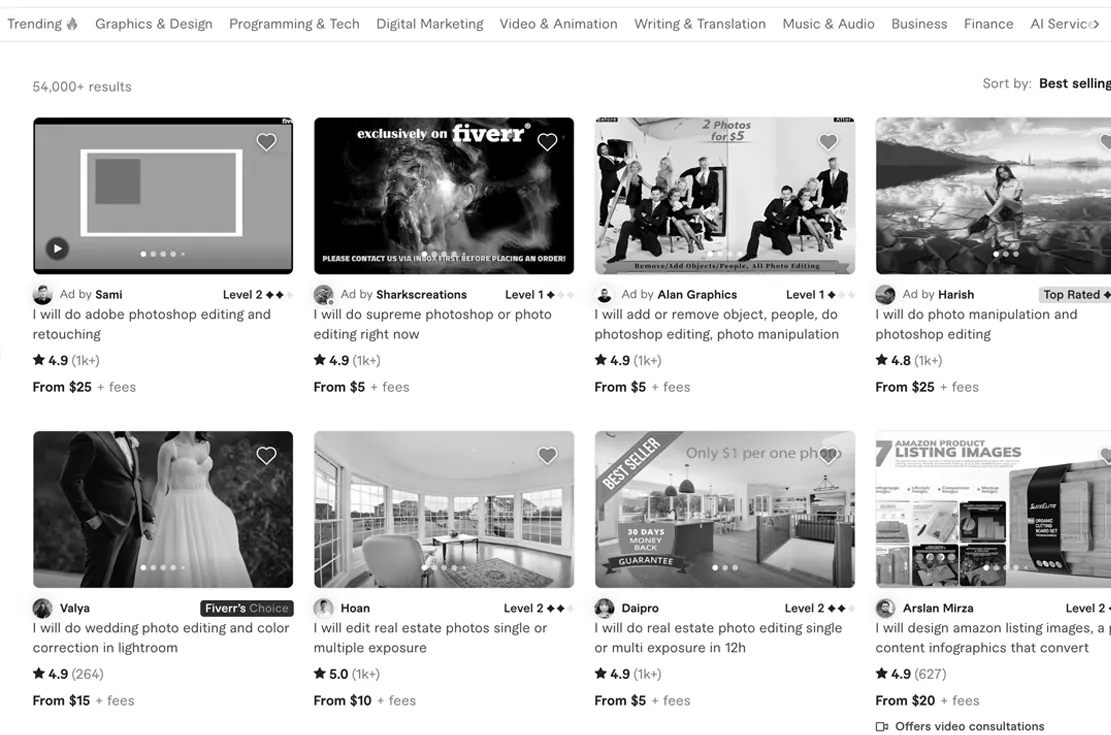
Popular platforms:
- Fiverr (fiverr.com) – gig-based listings with fixed-price packages. When we checked (4 November 2026), listing start prices on the first page of results for “photo retouching” ran from US$9 to US$349, and half were US$30 or less; a start price is a listing's cheapest package, and experienced retouchers charge more. Fiverr and a done-for-you service, compared.
- Upwork (upwork.com) – project-based hiring with hourly or fixed contracts.
- Freelancer (freelancer.com) – bidding-style marketplace where you post a job and receive proposals.
Advantages: lower entry cost than most studios; flexible scope; specialists for niche work such as jewelry, restoration or composites. Many sellers offer free revisions, and platform policies cover refunds when results are unsatisfactory.
Limitations: quality varies widely and portfolios may not reflect current skill; turnaround ranges from hours to days depending on workload and time zone; no money-back policy beyond the platform's dispute process; you do more of the work — writing a clear brief, sharing references, giving timely feedback.
Best fit: buyers with clear specifications who are willing to vet candidates and want a balance between cost and customization.
3. Done-for-you retouching services
You send the files, say what you want, and get finished images back. No software to learn, no freelancers to coordinate: a team handles every step, so results are consistent and delivered within a stated timeframe. This suits photographers with regular shoots, sellers with large catalogs, and anyone who values dependable turnaround over doing it themselves.
How it differs from DIY tools
- Human judgment where it matters. Light, skin texture, edges and overall realism — calls a preset or filter can't reliably make.
- Built‑in quality checks. Images are reviewed against your brief before delivery.
- Capacity. Hundreds of files can move in parallel while style and turnaround stay consistent.
- Specialized work beyond apps. Clean object removals, believable composites, perspective fixes.
Ten services we looked at, side by side: Digi5 Studios, Picsera, Vital Edit, Tucia, Retouche, Pixelz, Retouch.ca, FixThePhoto, WeEdit.photos, PhotoRelive,
|
Retouch.ca
|
Tucia
|
Picsera
|
Retouche
|
VitalEdit
|
Pixelz
|
Digi5
|
FixThePhoto
|
WeEdit.photos
|
PhotoRelive
|
|
|---|---|---|---|---|---|---|---|---|---|---|
| Company Base |
🇨🇦 Canada
|
🇨🇦 Canada
|
🇺🇸 USA
|
🇺🇸 USA
|
🇺🇸 USA
|
🇩🇰 Denmark
|
🇮🇳 India
|
🌐 Not shown
|
🌐 Not shown
|
🌐 Not shown
|
| Typical Price |
⚠️ Custom quote only
|
From US$8
|
⚠️ Custom quote only
|
US$12–15
|
US$45/hour
|
US$95–1,995/month
|
From US$0.75
|
From US$6
|
From US$6
|
US$2.5–4
|
| Turnaround Time |
⚠️ Not shown
|
Typically 24h
|
⚠️ Not shown
|
Typically 24h
|
Typically 24h
|
Varies
|
⚠️ Not shown
|
Standard 48h
|
Typically 48h
|
24h for 100 photos
|
| RAW File Upload |
⚠️ Not shown
|
✅ Supported
|
⚠️ Not shown
|
⚠️ Not shown
|
⚠️ Not shown
|
✅ Supported
|
⚠️ Not shown
|
✅ Supported
|
⚠️ Not shown
|
⚠️ Not shown
|
| HEIC File Upload |
⚠️ Not shown
|
✅ Supported
|
⚠️ Not shown
|
⚠️ Not shown
|
⚠️ Not shown
|
✅ Supported
|
⚠️ Not shown
|
✅ Supported
|
⚠️ Not shown
|
⚠️ Not shown
|
| Free Revisions |
⚠️ Not shown
|
✅ Yes
|
✅ Yes
|
✅ Yes
|
✅ Yes
|
⚠️ Not shown
|
⚠️ Not shown
|
✅ Yes
|
✅ Yes
|
✅ Yes
|
| Money-back Guarantee |
⚠️ Not shown
|
✅ Yes
|
⚠️ Not shown
|
✅ Yes
|
⚠️ Not shown
|
⚠️ Not shown
|
⚠️ Not shown
|
⚠️ Not shown
|
⚠️ Not shown
|
⚠️ Not shown
|
Source: each provider's or marketplace's own public website, August 2025. “Not shown” means the provider's site didn't state it at the time. Prices and policies change; confirm on the provider's site before ordering. The Fiverr figures were re-checked on 4 November 2026.
Six things to ask any retouching service
- What's the unit of pricing? Per photo, per hour, per month — and what counts as one photo when the job is complex.
- What's the real turnaround, and is there a rush option? A stated window beats “fast”.
- Which files in, which files out? RAW and HEIC in; full resolution out, not a downsized copy.
- What happens if the first result isn't right? How many revisions, for how long, and whether you get your money back.
- Who does the editing — and what is AI used for? Ask which steps are automated and whether a person checks the result.
- Where do my photos go? Are they shown in a portfolio, shared, or used to train AI?
Where Tucia fits
We're one of the done-for-you services in the table. Here's how we answer the six questions, so you can compare like for like:
- Pricing: per photo you send us to edit, from 1 credit (US$8); the price shown is an estimate, and we ask before charging extra for bigger jobs. Pricing
- Turnaround: most within 24 hours (up to 5 photos), 1–2 days for 6–20; no paid rush.
- Files: RAW (CR2, NEF, ARW…), HEIC, Lightroom XMP in; original resolution or higher out; up to 500 MB per file.
- If it's not right: free revisions for 14 days after delivery, then a full refund. Revision policy
- Who edits: a human editor on every photo. AI helps with some steps, such as reducing blur or enlarging a low-resolution photo, but the work is mainly done by hand (how we work).
- Your photos: never shared and never shown publicly. Based in BC, Canada.
If you need rates under US$5 per image or a high-volume ecommerce pipeline with monthly plans, the table above lists providers built for that. For single photos, mixed requests and edits that need judgment, our examples show what to expect.


